How to set up bookings for Pilates and group classes

For each Pilates class, you need to know how many places remain, who is coming and how they will pay. Meety brings group timetables, private training, class passes, subscriptions and payments together. Clients choose a session and book a place online. You do not have to update an attendance list after every message.
For reformer Pilates, the number of machines determines capacity. For mat classes, it depends on the space and how many people you want to teach. The booking system then enforces that limit, even while you are teaching another class.
Private training and group classes use different booking rules
Clients book private training from an instructor's available times. For a group class, they choose a place in a scheduled session. In Meety, you can offer both on one booking page.
| What you offer | How the client books | What you set in Meety |
|---|---|---|
| Private training | Chooses an available appointment | Duration, price and instructor availability |
| Reformer Pilates | Chooses a scheduled class | Time, instructor and capacity based on the number of reformers |
| Group mat Pilates | Reserves a place in a class | Timetable, price per place and capacity |
A studio can offer private training in the morning and group classes in the evening. For individual appointments, set each instructor's availability. Each can also connect their Google Calendar. Events marked as busy then prevent clients from booking private training at the same time.
Meety tracks class capacity
Choose the Lesson service type and set the default number of places. If you have six reformers, a class can have six places. You can change the capacity for a particular session, for example when a machine is out of use.
Meety tracks reserved places and stops accepting bookings when the class is full. You can see each session's occupancy in the calendar. There is no need to count sign-ups in messages and compare them with a paper list.
One client can book several places
In Meety, one client can book several places in a group class if you allow it for that service. They can book for a friend or a larger group. This can include ten places if your per-booking limit and the class's remaining capacity allow it.
For example, a client books two of six available places, leaving four. At €22 per place, the total for both is €44. Meety calculates the price and any deposit from the number of places.
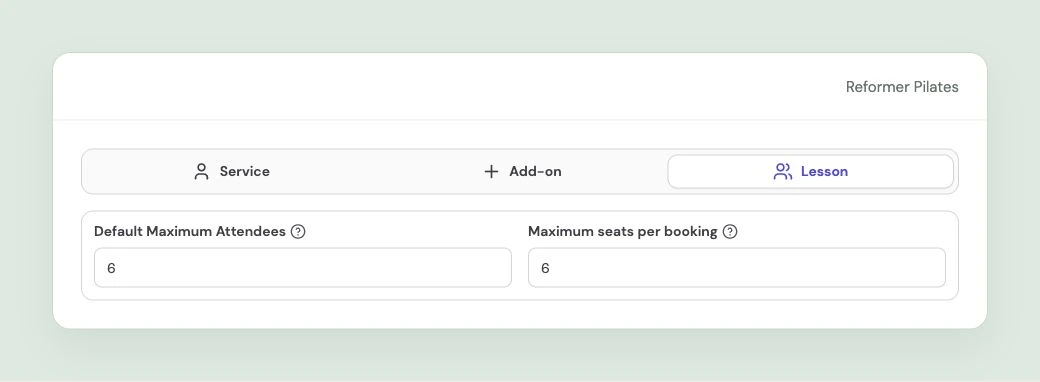
Class capacity and the number of places allowed in one booking.
Set up the weekly timetable once
You do not have to create a regular class again every week. Set the time, instructor, capacity and recurrence in the calendar. Meety creates the individual sessions for clients to book.
If you need to change the time or capacity for one Tuesday, edit that session. The other classes in the series keep their original schedule. See the group lessons guide for the setup.
Explore Meety for Pilates studios and manage group timetables and private training in the same calendar.
A single class, a class pass or a subscription
A new client can buy one class. For regular visitors, you can offer a one-time pass with several entries or a subscription with recurring payments.
You can also sell a class pass as a subscription in Meety. Payments repeat at the configured interval. After a successful payment, entries renew according to the subscription settings. The client does not have to buy a new pass each time.
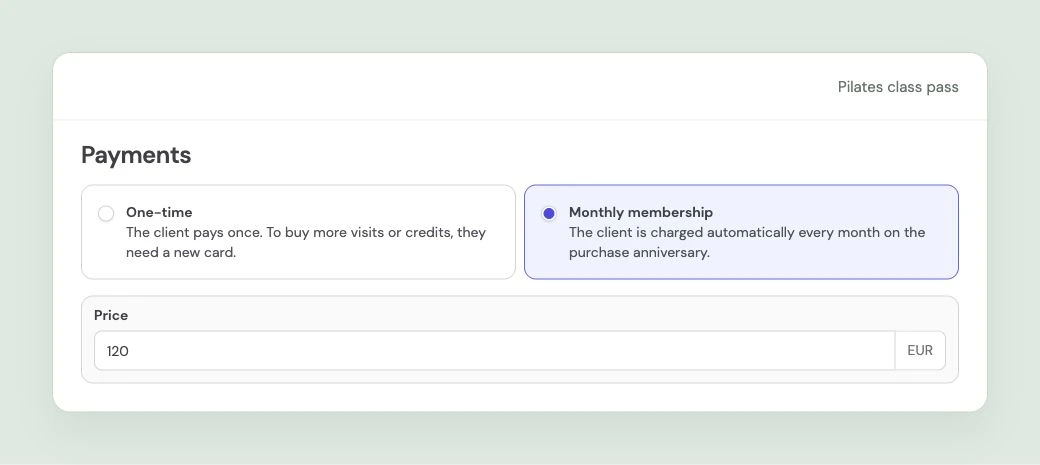
One-time class passes and recurring subscriptions.
When a client books with a pass, Meety checks its validity and available entries, then deducts an entry for each place booked. If a client uses one pass to book two places in a class it covers, two entries are used. You do not have to adjust the balance by hand.
Clients can buy a pass online from your booking page. They receive an email with its code and use it for their next booking. Clients can see the balance on the pass details page; you can see it in Meety. The class-pass guide explains service coverage, entry counts and validity.
You can collect the full class price upfront
Full upfront payment can suit a class with a fixed price per place. Clients pay when booking and, if the price stays the same, have no balance to pay on arrival. For another service, you can choose a deposit or payment on arrival.
In Meety, you set the payment method for each service. A group class can require full payment while private training requires a deposit. Online payments are processed by Stripe and are available on Solo and Premium plans. See the online payments guide for details.
Connect payment to your free-cancellation deadline. Meety shows clients a summary of your configured cancellation policy during booking. You can also use a deposit as a late-cancellation fee. The booking deposits guide explains these options.
When a client cancels a place
With reminders enabled, clients receive an automatic message before class. If they cannot attend, an early cancellation gives someone else time to book. You can send the reminder before your free-cancellation deadline. Our guide to reminders, payments and reducing no-shows covers the other options.
When a place opens in a full class, Meety can automatically notify people on that session's waitlist. Clients receive an email with a booking link and, if SMS communication is enabled, a text message too. They can then book through the link. You do not have to call each person who missed out on a place.
Choose how notifications are sent in the waitlist settings. You can notify all suitable people at once or give existing clients priority.
When too few people sign up
For each class, you can set a minimum attendance and a deadline to reach it. With automatic cancellation enabled, Meety warns your team about an underfilled class in advance. If it has not reached the configured minimum by the cutoff, Meety cancels it and handles refunds of payments received.
For example, a class with six places might need at least three participants, with a cutoff 12 hours before it starts. Choose the capacity, minimum and cutoff around your studio.
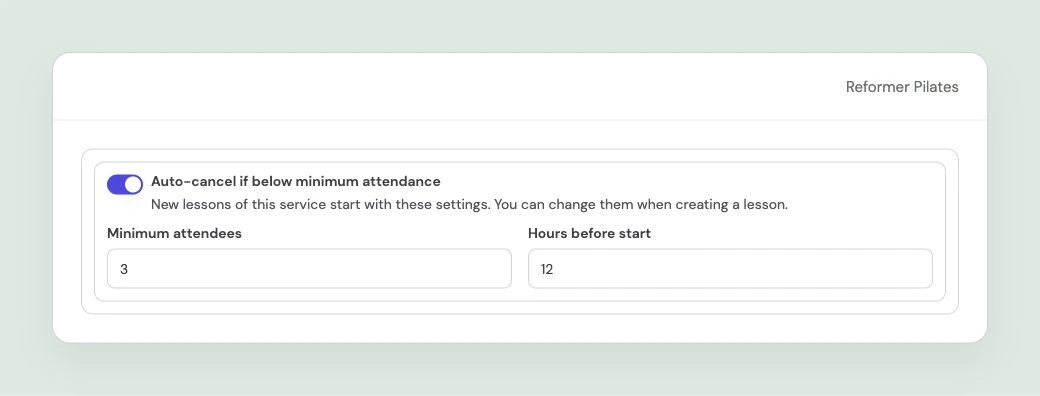
Minimum attendance of three and a cutoff 12 hours before class.
You can set these defaults on the service for new classes. For an individual session, you can change them or turn automatic cancellation off. You do not have to handle underfilled classes and their refunds separately before each session.
Invite clients back to class
When a regular visitor has not booked for a while, they can receive an invitation to another class. Set up an automatic campaign in Meety based on the time since their last completed visit. Choose email or SMS and edit the message.
The campaign selects eligible clients with marketing consent and skips anyone who already has another pending or confirmed booking. You do not have to build the list by hand. The guide to winning back inactive clients covers timing and sample messages.
Pilates booking FAQs
Can Meety combine reformer Pilates and private training?
Yes. You can offer group classes with a capacity limit and private appointments based on instructor availability on the same booking page. Each service can have its own duration, price and payment method.
How do I set capacity based on the number of reformers?
Set the default capacity on a Lesson service. You can adjust it for an individual session. Meety tracks reserved places and stops accepting bookings once the configured capacity is reached.
Can one client book places for other people?
Yes. Set the maximum number of places per booking on the service. A client can book several places, including ten if that limit and the remaining class capacity allow it. Meety calculates the price and deposit and deducts a pass entry for each place booked.
Do I have to create a new timetable every week?
No. You can make a class recurring. Meety creates the individual sessions from that recurrence, and clients book places in them. You can edit one session separately.
Can I collect the full price before class?
Yes. In Meety, you can require full payment at booking or a deposit for each service. Clients with a valid pass can use its entries for classes it covers. Online payments are processed by Stripe and are available on Solo and Premium plans.
Can I offer a class pass as a subscription?
Yes. Meety supports one-time class passes and subscriptions with recurring payments. After a successful payment for the next period, entries renew according to the subscription settings.
What happens when a place opens in a full class?
With the waitlist enabled, Meety notifies eligible people who have joined the waitlist for that session. It sends them a link to book the available place.
Can Meety cancel a class with too few participants?
Yes. Enable automatic cancellation and set the minimum attendance and cutoff. Meety warns your team in advance, cancels the class if it remains below the minimum and handles refunds of payments received.
Meety handles future bookings
You choose your classes, their capacity, payment methods and cancellation deadlines. Meety then tracks capacity, processes payments, deducts pass entries and sends the notifications you have enabled.